

Table of contents
Phishing is a type of digital fraud in which scammers pretend to be trusted companies, banks, or individuals to trick you into revealing personal data (login credentials, password, national ID/CPF, credit card, etc.). These attacks can occur via email, SMS, WhatsApp, social media, or fake websites. The severity is high: according to Kaspersky, 286 million blocked phishing attempts were recorded in Latin America over 12 months – an increase of 617% compared to the previous period. In Brazil, that jump was more than fivefold. It is worth noting that CERT.br (the Brazilian incident response center) defines phishing pages as fake websites created to obtain financial gain, such as stealing banking details or credit cards. These numbers show that no one is completely immune to this risk, which is why it is important to know how to identify and avoid these scams.
How Phishing Works (and Real Examples)
Scammers use multiple channels to attack: email, SMS, WhatsApp, social media, and fake websites are the most common. In general, a phishing message has some manipulative trait, such as urgency (“your account will be blocked in 24h!”), an unrealistic promise (“win R$ 5,000 for free!”), or a request for personal information. Fraudsters copy well-known brands and try to deceive through appearance (bank logo, similar wording, etc.). See some typical scenarios (illustrative images):
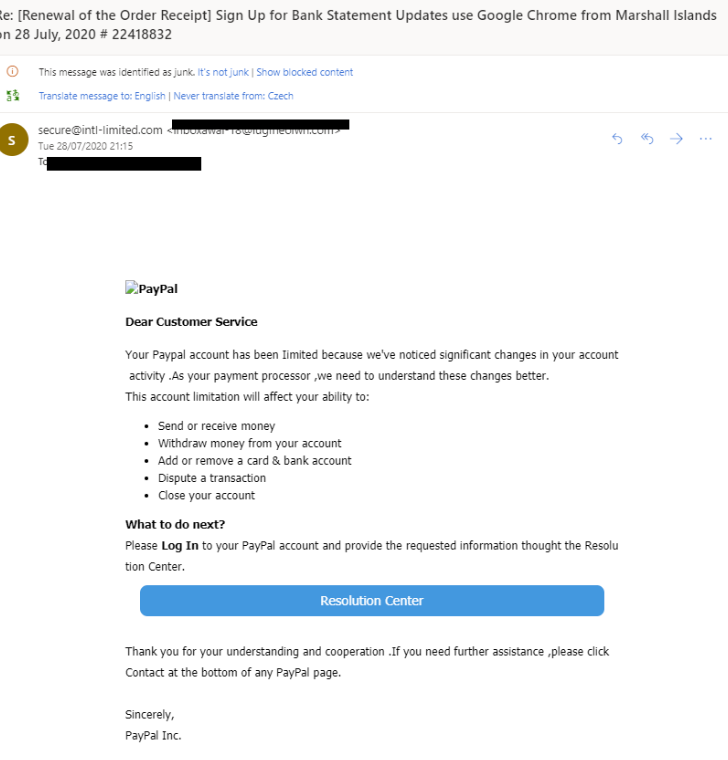
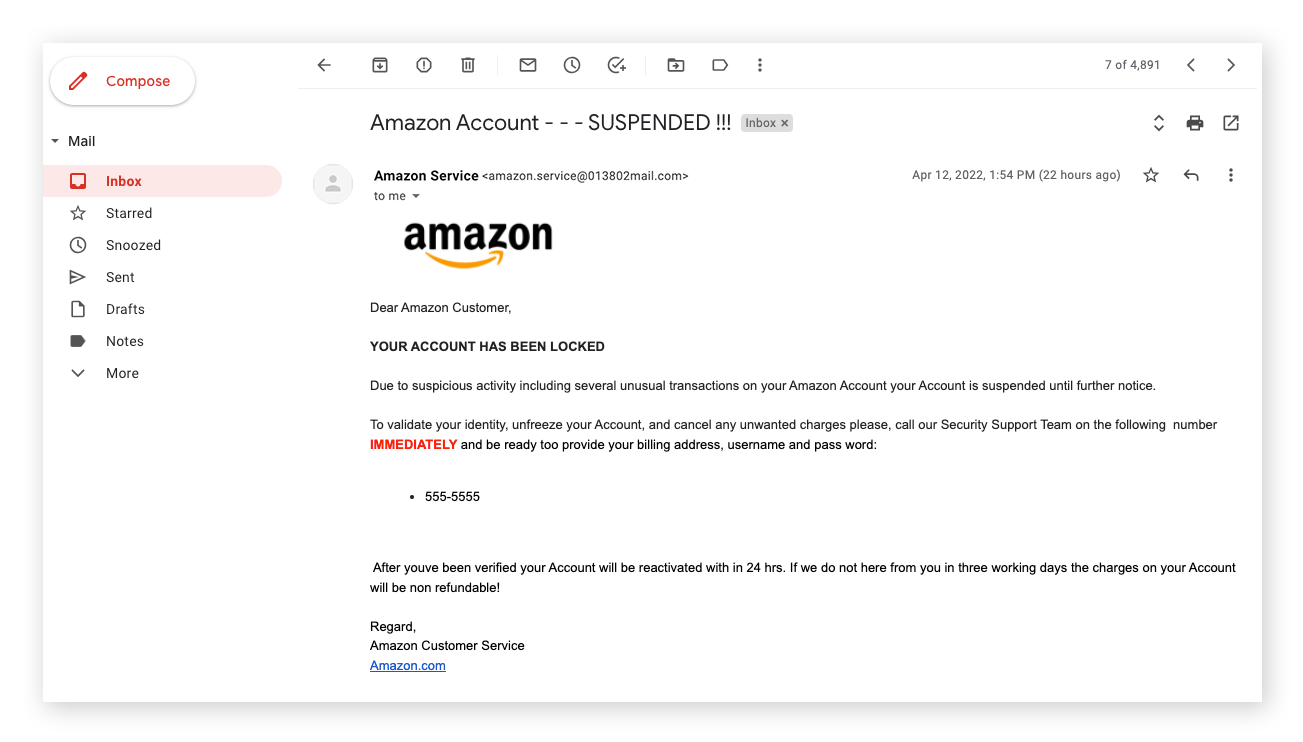
- Email: The fraudster sends an email that appears to be from a bank or store. There are usually grammar and spelling errors (such as “usuario” missing an accent, lack of agreement, awkward wording) and a suspicious link. For example:
“Dear customer, we identified suspicious activity on your account. To reactivate, visit
banco-seguro.conferir-login.com.xn--ivg
In this case, the sender may be an unfamiliar email address (it does not end in @yourbank.com) and the link is not the bank's official one. - SMS: Scammers send a text message pretending to be a delivery company, store, or bank. A common example:
“Bank Alert: Your account has been blocked. Click to unblock: bit.ly/recuperar.”
Warning signs include an unknown sender number (not the company's official number), a shortened link (bit.ly, tinyurl, etc.), and rushed language. Never click: in the example above, the hidden link leads to a fake website. - WhatsApp/Social Media: The scam can arrive as a message on WhatsApp or social media. Example: a contact appears claiming to be from “Technical Support” of a service you use, sending a link or code. Or someone receives:
“Hello, this is Caixa Econômica, we need to update your details. Confirm your account by opening the link:
caixa-auxilio-covid.com.xn--br-02t
Attention: your bank never asks for your password or details via a link. Unknown senders and suspicious offers in personal messages are clear indicators of phishing.
The table below summarizes real examples and how to identify them:
| Type of Phishing | Message Content (example) | Warning Signs | What to Do |
| “Dear customer, we detected suspicious activity at your Bank X. Click to confirm: banco-seguro.com" | Unusual sender (e.g., generic, non-official email); grammar or spelling errors (e.g., incorrect agreement); suspicious link (domain different from the bank's website) | Do not click. Verify by accessing the bank's official website by typing the address in your browser or calling support. Report the email as a scam. | |
| SMS | “Your Correios package is awaiting pickup. Visit correios-entrega.com to schedule” | Unknown sender (short code or international number); shortened/suspicious link; urgency without details | Ignore / do not click the link. Check directly on the official Correios website by typing the address. Delete the message and block the sender. |
| “Friend, I'm from HR at Company Y. I need you to update your vacation record. Fill it out here: empresay-promocao.xn--com-9o0a" | Unknown number (not from real HR); fake website (strange domain); unexpected request for personal data | Do not provide data. Confirm with official HR through a known channel. Block the contact and report the message as a scam. |
Types of Phishing (Simplified Overview)
- Traditional Phishing: Mass attack, usually via generic email. The fraudster does not know much about the victim and sends thousands of fake emails hoping someone falls for the scam. Red flags: generic approach (“Dear customer”), suspicious links, and often spelling mistakes.
- Spear Phishing: Scam targeted at a specific person or group (usually companies). Attackers research the victim (name, job title, colleagues) and send a personalized message pretending to be someone familiar. It can arrive via “internal” email or social media. Because of its sophistication, it is harder to identify, so be cautious with any unexpected request, even if it appears to come from a colleague.
- Vishing (Voice Phishing): Phishing by phone. Criminals call claiming to be from the bank, police, or a government agency, creating urgency (“we will block your account!”, “investigation”). Tactic: they ask you to confirm details or take actions (such as transferring funds or entering/recording a password). Tip: never share passwords or PINs over the phone. If you receive a strange call, hang up and contact the institution using an official number.
- Smishing: Phishing via SMS. As in the example above, they try to deceive via text message. The tactic is the same as email: links to fake sites, tempting offers, or fake alerts. Take special care when receiving SMS messages with URLs, especially shortened ones, and always verify the sender (official banks and stores use specific numbers).
Protection Technologies
- Two-Factor Authentication (2FA): Consists of requiring a second code (via app or SMS) in addition to your password to access accounts. Even if a thief steals your password, they will not have this temporary code. 2FA is crucial and recommended by experts. To enable it, go to the security settings of each account (email, social media, banks) and look for “Two-step verification” or “Two-factor authentication.” Follow the instructions to register your mobile phone or authenticator app (e.g., Google Authenticator, Authy). Once active, it prevents most automated attacks.
- Antivirus and Antimalware: These programs protect your device by detecting malicious applications and fake payment slips. Keeping them updated helps block malware that phishing can install (for example, when opening infected attachments). Install a reliable antivirus (Windows Defender already comes with Windows; there are other renowned options like Avast, Kaspersky, Norton) and schedule periodic scans. Many protections also analyze links before you click and warn you about unsafe websites.
- Spam and Email Filters: Your provider's spam filter (Gmail, Outlook, etc.) already eliminates a large portion of malicious emails. Keep this filter enabled and always mark any suspicious email as spam. In corporate use or for those who have their own server, configuring custom rules (blocking unfamiliar domains, requiring DKIM/SPF signatures) helps stop phishing messages before they arrive.
- Browsers with Anti-Phishing Protection: Chrome, Firefox, Edge, and other modern browsers have “safe browsing” enabled by default, which blocks sites recognized as dangerous. Always keep your browser updated to receive new lists of malicious sites. For example, Chrome displays a red warning if you try to access a site it knows is a scam. Thus, even if you click a deceptive link, the browser can prevent the visit.
- Password Managers: Tools like Bitwarden, LastPass, or 1Password help create and store strong, different passwords for each website. When using a password manager, it automatically fills in the password only if the site's domain is exactly the right one, preventing you from entering data on fake pages (e.g., “gogle.com” does not trigger “google.com”). Use them to avoid repeating passwords and make maintaining secure credentials easier.
How to Protect Yourself in Practice (Essential Tips)
- Check the sender: Always check the full email address of who sent the message. Watch out for lookalike domains (e.g., “bancoexemplo123.com.br” instead of bancoexemplo.com.br).
- Hover over links: Before clicking, position the pointer over the link (or press and hold on mobile). See if the displayed address (URL) is the same as the official website. If it looks strange, do not click.
- Be suspicious of “too good” offers: Scams frequently offer prizes, coupons, or easy money. Use critical judgment: if the promotion sounds unrealistic, it is probably fraud.
- Never provide personal data via a link: Do not enter passwords, security codes, or banking details just by clicking an email/SMS link. If in doubt, access the official website by typing the address in the browser bar or call the company directly.
Keep everything updated: Operating system, browser, and app updates close security gaps. Enable automatic updates whenever possible. - Use strong, unique passwords: Create long passwords with letters, numbers, and symbols, different for each service. This prevents an attack on one website from compromising your other accounts.
- Monitor bank statements: Periodically check your transactions. Issues like small unrecognized purchases can signal fraud in progress.
- Type addresses manually: For important websites (bank, email, stores), prefer typing the address in your browser instead of clicking links. That way, you avoid falling into fake websites with similar names.
- Be careful with attachments: Do not open attachments from unknown sources or unexpected messages (even if seemingly official). Prefer downloading files only from trusted websites.
Help Others Protect Themselves
Phishing does not affect only you: friends, colleagues, and family members, especially older adults and people less accustomed to the internet, can be easy targets. Share this information with them! Explain how to identify suspicious messages and offer help setting up protections (such as 2FA or antivirus) on their devices. Most scams spread because of someone's lack of awareness; the more people know how to recognize phishing, the smaller the fraudsters' reach will be.
Conclusion
Phishing is an increasingly common online scam, but with attention and safe habits you can avoid it. Remember the warning signs (grammar or spelling mistakes, strange links, false urgency) and use the available protections (2FA, antivirus, spam filters). Keep your personal data out of untrusted websites and educate those around you. With these simple practices, you make it much harder for scammers to act. Always stay vigilant and protect your digital security!